
The right YouTube thumbnail size is a 16:9 image. The long-standing standard is 1280×720 pixels, and YouTube's Help Center now lists 3840×2160 (4K) as the resolution, with a minimum width of 640 pixels. Use JPG or PNG. The file limit is 2 MB on the mobile app and 50 MB on desktop. Below is what each number means, which one to export, and how to keep your thumbnail from getting clipped.
YouTube thumbnail size, dimensions and resolution at a glance
- Aspect ratio: 16:9 for videos, 9:16 for Shorts.
- Resolution: 3840×2160 per YouTube's Help Center. 1280×720 is the classic standard and still works.
- Format: JPG or PNG.
- File size: up to 2 MB when uploading from mobile, up to 50 MB on desktop.
- Shorts thumbnails: 2160×3840, with a minimum height of 640 pixels.
Checked against YouTube's custom thumbnail help page in September 2026.
1280x720 or 3840x2160: which YouTube thumbnail size should you export?
For most creators, 1280×720 is still a good choice. It meets the 16:9 ratio and it stays comfortably under the 2 MB mobile limit. The higher limit matters where thumbnails are shown large: YouTube announced the jump from 2 MB to 50 MB in October 2025, pitching it as sharper thumbnails on TVs and big screens.
- Uploading from desktop and want the sharpest result on TVs and large displays: export at 3840×2160, as a JPG to keep the file size sensible.
- Uploading from the mobile app, or your design is mostly flat color and crisp text: 1280×720 keeps you under 2 MB. A 4K PNG can easily go past it.
- Either way: keep it 16:9 and never go below 640 pixels wide.
Never upload something smaller than your source design "because it's a thumbnail". YouTube will accept a low-resolution image and then scale it up everywhere it appears, and upscaling always looks softer than the original.
YouTube thumbnail aspect ratio: 16:9, with a safe zone
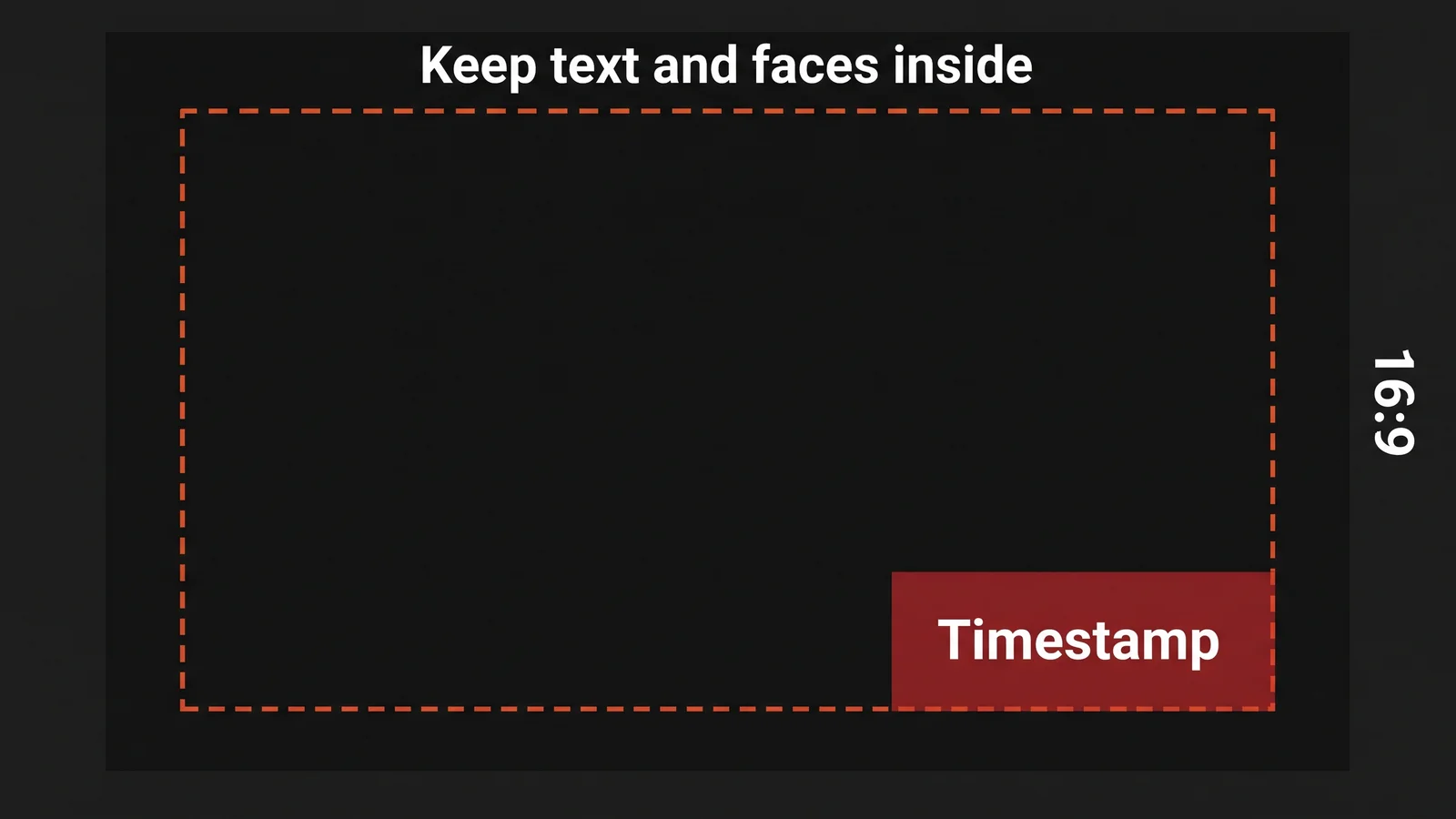
16:9 is the canvas you design on, but it isn't the only shape your thumbnail is shown in. Depending on where it appears, such as the mobile home feed, the Up Next list, or a playlist, it can be framed or cropped differently. A face or a word sitting flush against the left or right edge can get clipped.
The practical fix: keep your most important visual element and text within the center 80% of the frame, and treat the outer edges as a margin, not usable design space. Also keep key content out of the bottom-right corner, where YouTube overlays the video's timestamp.
YouTube thumbnail file size and format: JPG vs PNG
Staying under the file limit is rarely the hard part. The real risk is over-compressing a JPG to hit a smaller size, which adds visible banding and blocky artifacts in gradients and shadows, exactly the areas that need to look clean at a glance. If your design has flat color blocks or sharp text edges, export a PNG (as long as it fits the limit for the device you're uploading from), since PNG doesn't introduce that artifacting. For photo-heavy thumbnails, a high-quality JPG is usually the better size trade-off.
How to upload a custom thumbnail on YouTube
- Open YouTube Studio and go to Content.
- Click the video you want to change.
- Under Thumbnail, choose Upload file and pick your image.
- Click Save. The new thumbnail can take a few minutes to show up everywhere.
If you don't see the upload option, your channel may need to be verified first. Check your image against the size and format limits above before you upload, because a file that's too large or the wrong format will be rejected.
YouTube Shorts thumbnail size
- Vertical, 9:16, with a resolution of 2160×3840 and a minimum height of 640 pixels.
- Custom Shorts thumbnails are uploaded in YouTube Studio on a computer. YouTube's July 2026 announcement made them available to YouTube Partner Program creators, with more creators to follow. Everyone else can pick from suggested frames (three on desktop, or any frame in the mobile app).
- There's no A/B testing for Shorts thumbnails, unlike long-form videos.
- Vertical videos that use a 16:9 custom thumbnail have it replaced by an auto-generated 4:5 thumbnail on the home, explore, and subscription pages, so don't rely on a widescreen thumbnail for a vertical video.
Common YouTube thumbnail size mistakes
- Exporting below the minimum, or a small image that gets upscaled. It comes out soft everywhere.
- Ignoring the safe zone. Text or faces at the edges get clipped, and the timestamp covers the bottom-right corner.
- Over-compressing to save file size. Banding and blocky artifacts show up in gradients, the exact spots that should look clean.
- Judging the thumbnail zoomed in. Design and export at full size, but review it scaled down to roughly the size it appears in a feed. What reads clearly on your monitor can turn to mush on a phone. Small text is the most common casualty.
YouTube thumbnail size for live streams, playlists, and podcasts
Most other places use the same 16:9 image as regular videos. A few details differ.
- Live streams: the thumbnail follows the same 16:9 rules. Set it in the stream settings before you go live so viewers don't see an auto-picked frame.
- Playlists: YouTube has added custom playlist thumbnails. Check its playlist thumbnail help page for the current requirements, since they can differ from video thumbnails.
- Podcasts: episodes use 16:9 thumbnails, while the show's cover image is usually square. Our guide to YouTube podcast thumbnails explains both.
YouTube thumbnail size on mobile and phone
You design one image, and YouTube shows it at different sizes on different screens. There's no separate phone version to make. What changes on a phone is the upload limit, which is 2 MB from the mobile app, and how small the thumbnail appears in the feed, so keep text large. If you're working on your phone, see how to make a YouTube thumbnail on phone and how to change one from your phone.
YouTube thumbnail size in MB, KB, and pixels
Pixels describe the shape and sharpness of the image. Megabytes and kilobytes describe the file's weight. They're separate limits.
- Pixels: 1280×720 is the classic standard, and 1920×1080 also works. The minimum width is 640 pixels.
- File size: up to 2 MB (about 2,048 KB) from the mobile app, and up to 50 MB from a computer.
YouTube thumbnail size in inches and cm
Screens use pixels, not inches, so the physical size depends on the screen. If a design app asks for inches, the pixel dimensions are still what matter. At 96 pixels per inch, 1280×720 is 13.33 by 7.5 inches (about 33.9 by 19.1 cm), and 1920×1080 is 20 by 11.25 inches. At 72 pixels per inch, 1280×720 is about 17.8 by 10 inches. Set the resolution, then check the pixel dimensions before you export.
How to make a thumbnail file smaller
- Export photos as a JPG instead of a PNG.
- Lower the quality setting a little, to about 80 to 90 percent, and check that text edges still look clean.
- Resize to 1280×720 if the image is much larger.
- Avoid heavy noise and tiny details, which make files bigger.
Then confirm the result with the size checker.
Check your thumbnail before you upload
Not sure your export meets the limits? Drop it into our free YouTube thumbnail size checker. It checks the resolution, aspect ratio, format and file size, and overlays the safe zone, all in your browser.
The right size only gets your thumbnail displayed properly; it doesn't make anyone click. Once it's exported, run it through ThumbRoasty's free thumbnail analyzer for a 0-100 score and specific fixes on visual hierarchy, readability, and clickability. Choosing type for it? See the best fonts for YouTube thumbnails. Already live and not getting clicks? Start with this diagnostic checklist, then A/B test your versions.
With the size right, preview your thumbnail in the feed and follow our 15-minute thumbnail workflow.
Frequently asked questions
What is the best YouTube thumbnail size?
Use a 16:9 image. 1280×720 pixels is the long-standing standard and still works; YouTube's Help Center now lists 3840×2160 (4K). For most videos, 1280×720 is a safe choice, and 3840×2160 is worth it if you upload from desktop and want maximum sharpness on TVs.
What is the YouTube thumbnail aspect ratio?
16:9 for standard videos and 9:16 for Shorts. Keep your key content in the center 80% of the frame so it survives different crops and stays clear of the timestamp in the bottom-right corner.
What is the YouTube thumbnail size in pixels?
YouTube's Help Center lists 3840×2160 pixels for video thumbnails (2160×3840 for Shorts), with a minimum width of 640 pixels for videos. The widely used 1280×720 also meets the requirements.
What is the YouTube thumbnail resolution?
YouTube's Help Center lists 3840×2160 pixels. 1280×720 is the classic standard and still works. Any 16:9 resolution in between, such as 1920×1080, is also fine.
Is 1920x1080 a good YouTube thumbnail size?
Yes. 1920×1080 is 16:9 and far above the 640-pixel minimum, so YouTube accepts it. It's a good middle ground: sharper than 1280×720 and easy to keep under the 2 MB mobile limit as a JPG.
What is the maximum YouTube thumbnail file size?
50 MB when uploading from a desktop and 2 MB for video thumbnails when uploading from the mobile app. The limit was 2 MB everywhere until YouTube raised the desktop limit.
What size is a YouTube Shorts thumbnail?
2160×3840 pixels at a 9:16 aspect ratio, with a minimum height of 640 pixels. Custom Shorts thumbnails are uploaded in YouTube Studio on a computer and, as of YouTube's July 2026 announcement, are available to YouTube Partner Program creators, with more creators to follow.
What is the YouTube thumbnail size for live streams?
The same as regular videos: a 16:9 image, with 1280×720 a safe choice. Set it in the stream settings before you go live.
What size should a YouTube thumbnail be on mobile?
There's no separate size for phones. Design one 16:9 image, keep it under 2 MB if you upload from the mobile app, and keep text large because it appears small in the feed.
What is the YouTube thumbnail size in inches?
Pixels are what matter, not inches. At 96 pixels per inch, 1280×720 is 13.33 by 7.5 inches.


